MAKER · BEDROCK
Invent a mob Minecraft doesn't have
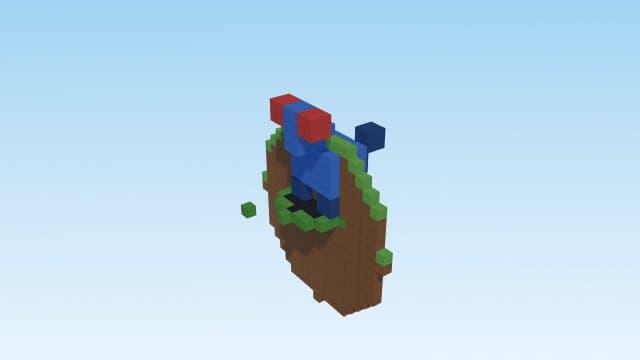
Describe a creature and the engine builds a genuinely new Bedrock entity: custom geometry, idle and walk animations, a procedurally-rendered texture, loot drops, a spawn egg and spawn rules. Not a renamed vanilla mob — a new one, packaged as a single add-on.
Try it right here
Free, no account — one mod a day, and a refusal never costs you one.
Actual generated output
"Glowing Crystal Chameleon" — a brand-new neutral creature (24 HP, 5 melee damage) with custom geometry, idle and walk animations, a rendered texture, a spawn egg and its own loot.
- Format
- Bedrock add-on
- Edition
- Minecraft Bedrock
- Download
- glowing-crystal-chameleon.mcaddon
- Version context
- Manifest minimum: 1.21.0, 1.21.0
Included files (16)
README.txt
behavior_pack/entities/glowing_crystal_chameleon.json
behavior_pack/loot_tables/entities/glowing_crystal_chameleon.json
behavior_pack/manifest.json
behavior_pack/pack_icon.png
behavior_pack/spawn_rules/glowing_crystal_chameleon.json
resource_pack/animation_controllers/glowing_crystal_chameleon.ac.json
resource_pack/animations/glowing_crystal_chameleon.animation.json
resource_pack/entity/glowing_crystal_chameleon.entity.json
resource_pack/manifest.json
resource_pack/models/entity/glowing_crystal_chameleon.geo.json
resource_pack/pack_icon.png
resource_pack/render_controllers/glowing_crystal_chameleon.rc.json
resource_pack/texts/en_US.lang
resource_pack/texts/languages.json
resource_pack/textures/entity/glowing_crystal_chameleon.png
Installation and verification
- Back up a Bedrock world. Open the mcpack or mcaddon with Minecraft on a device that supports local pack imports.
- Activate the imported behavior and resource packs on the same world when both are included.
- Read README and manifest.json for the minimum engine version, script dependencies and controls. Test in a copy of the world; console file-import workflows vary.
This file inventory is produced from the example prompt by the repository generator. Structural checks do not prove every gameplay interaction, performance level, device or future Minecraft version. Generated assets can conflict with other packs.
How pack validation worksHow it works
- 1Describe it: "a glowing crystal chameleon creature" — traits and colors shape the model and texture.
- 2Open the .mcaddon to import it, then enable it on your world.
- 3Use its spawn egg (creative) or let it spawn naturally by its rules.
Questions people ask
Is it a real new entity?
Yes — its own entity id, geometry, animations and texture, with a spawn egg and loot. Not a reskin of an existing mob.
Can I control where it spawns?
Spawn rules are generated from your description; in creative you can always use its spawn egg.
Does it work on phones?
Yes — it's a Bedrock add-on, so it runs everywhere Bedrock does, and it's runtime-tested by CI.
Capabilities and limitations
Bedrock behavior, resources and scripts are different from Java mods. Check the actual manifest minimum version and the generated README. Desktop/mobile local imports differ from console workflows. Only supported mechanics are generated; an import alone does not prove a script ran.
Generated files pass structural checks, and representative packs have automated runtime tests. Test your particular creation in a copy of the world. Read the validation methodology.